How to Vacuum an Air Conditioning System Expert 2027
Properly vacuuming an AC system is crucial to remove harmful moisture and non-condensable gases that degrade performance and cause damage. This guide provides the exact step-by-step instructions and essential equipment to perform a successful vacuum evacuation, ensuring your system runs efficiently in 2027.
Successfully vacuuming an air conditioning system is not merely a step; it is the single most critical procedure to ensure your system performs efficiently, reliably, and lasts for its intended lifespan. By directly addressing the removal of moisture and non-condensable gases, you are actively preventing premature component failure and optimizing energy consumption. For any AC system installed or serviced in 2027, mastering this evacuation process is fundamental to peak operation.
This guide will equip you with the precise, step-by-step instructions and essential equipment needed to properly evacuate an AC system. Understanding the ‘how-to’ ensures you protect your investment, maintain system integrity, and achieve the cooling performance you expect, avoiding costly repairs and inefficiencies down the line.
Key Takeaways
- Remove moisture and non-condensables for AC longevity.
- Use a dedicated micron gauge for accurate vacuum levels.
- Always perform a vacuum hold test to detect leaks.
- Essential tools include pump, manifold, micron gauge.
- Prioritize safety:wear eye protection and gloves.
Why Your AC System Needs Vacuuming: Preventing Damage and Inefficiency
The Silent Saboteurs: Moisture and Non-Condensable Gases
Your AC system’s worst enemies are often invisible: moisture (water vapor) and non-condensable gases (NCGs), primarily air. When an AC system is opened for service or installation, these elements infiltrate the lines. Moisture, when combined with refrigerant and compressor oil under heat, forms corrosive acids – specifically hydrochloric and hydrofluoric acid. These acids aggressively degrade the compressor’s motor windings, internal seals, and other vital components, leading to eventual compressor failure. Furthermore, any remaining moisture can freeze at the system’s expansion device (TXV or capillary tube), causing a blockage and effectively shutting down cooling.
Non-condensable gases, like nitrogen and oxygen from the air, are equally detrimental. Unlike refrigerant, these gases cannot condense at the system’s operating pressures and temperatures. Their presence significantly increases the head pressure on the compressor, forcing it to work harder and consume more electricity. This leads to:
- Reduced cooling capacity (lower BTU output).
- Increased energy bills.
- Accelerated wear and tear on the compressor.
- Higher discharge temperatures, breaking down compressor oil faster.
Proper evacuation removes these contaminants, ensuring a clean, dry internal environment essential for modern, high-efficiency systems and their more sensitive refrigerants, which are increasingly common in 2027.
Protecting Your Investment and Performance Longevity
A deep, thorough vacuum is your insurance policy for AC system longevity and efficiency. Ignoring this crucial step leads directly to diminished performance and premature component failure, negating the benefits of even the most advanced 2027-compliant equipment. Inadequate vacuuming results in:
- Reduced Lifespan: A compressor operating under the stress of NCGs or corrosive acids will fail years earlier than expected, leading to expensive replacements.
- Higher Operating Costs: An inefficient system wastes electricity, translating directly into higher utility bills for you.
- Compromised Cooling: The system simply won’t cool as effectively or consistently, especially during peak demand.
- Warranty Issues: Many manufacturers’ warranties require proof of proper installation and evacuation techniques. Failure to adequately vacuum can void your coverage.
Investing the time and using the right tools to achieve a deep vacuum protects your significant investment, ensures maximum cooling comfort, and aligns with the expected performance standards of modern AC technology.
From Start to Finish: HVAC Vacuuming Explained
Properly evacuating an air conditioning system is perhaps one of the most critical, yet often overlooked, steps during installation or major repairs. This process, commonly known as vacuuming, involves removing all non-condensable gases (like air) and, crucially, moisture from the refrigerant lines and coils. Failing to achieve a deep vacuum can lead to catastrophic system failure, reduced efficiency, acid formation, and a significantly shortened lifespan for your expensive HVAC equipment. This guide will walk you through each step to ensure your system is prepared for optimal performance and longevity.
Step 1: Gather Your Essential Tools and Safety Gear
What you need: Safety glasses, work gloves, vacuum pump (rated for HVAC use, ideally 6 CFM or higher for residential systems), manifold gauge set (compatible with your refrigerant type, e.g., R-410A or R-22), vacuum pump oil (correct type for your pump), service wrenches, core removal tool (optional but highly recommended), and potentially a dedicated micron gauge for precise readings.
Instructions: Before you begin any work, ensure you have all necessary tools laid out and ready. Safety gear is non-negotiable; always wear safety glasses to protect against refrigerant splashes and gloves to prevent frostbite from cold components. Verify your vacuum pump oil level and clarity; change it if it looks cloudy or dark, as clean oil is vital for achieving a deep vacuum.
Pro Tip: A high-quality two-stage vacuum pump with a good CFM rating will significantly speed up the evacuation process and help you achieve a deeper vacuum more reliably. Ensure your manifold gauge set has hoses in good condition, without cracks or leaks.
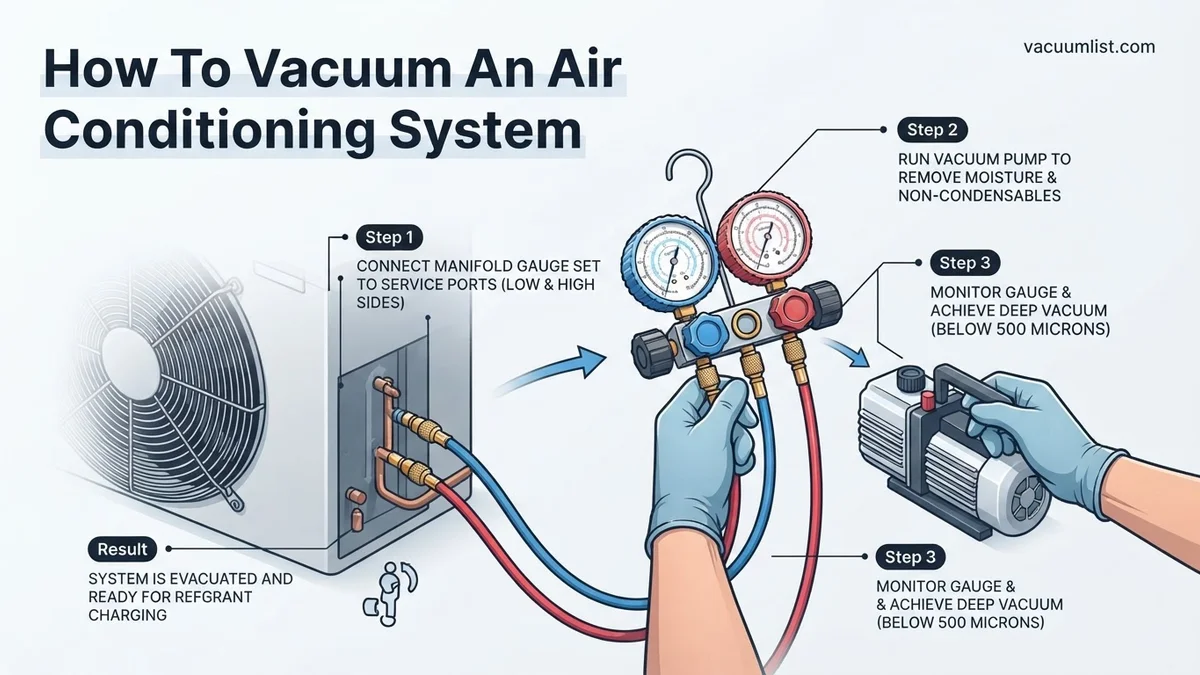
Step 2: Connect the Manifold Gauge Set to Service Ports
What you need: Manifold gauge set, service wrenches.
Instructions: Locate the service ports on your outdoor condenser unit. Typically, there’s a larger line (suction line, low side) and a smaller line (liquid line, high side). Connect the blue hose from your manifold gauge set to the low-side service port and the red hose to the high-side service port. Ensure these connections are hand-tight, then use a service wrench to tighten them an additional quarter to half turn, preventing vacuum leaks. If using a core removal tool, install it now on both ports before connecting the hoses to minimize air ingress and allow for efficient evacuation.
Pro Tip: Always double-check that you are connecting the correct hoses to the appropriate service ports. Reversing them can lead to incorrect readings and potential issues later. If using a core removal tool, make sure the Schrader valve cores are fully extracted before starting the vacuum for faster evacuation.
Step 3: Connect the Vacuum Pump to the Manifold Gauge Set
What you need: Vacuum pump, manifold gauge set.
Instructions: Take the yellow (center) hose from your manifold gauge set and connect it securely to the intake port of your vacuum pump. Again, hand-tighten, then use a wrench to ensure a firm, leak-free connection. Before turning on the pump, ensure both the high-side (red) and low-side (blue) valves on your manifold gauge set are in the closed position to avoid drawing air into the system prematurely. Visually inspect all hose connections one final time for any potential loose points.
Pro Tip: For even faster evacuation, especially on larger systems or those with longer line sets, consider using a vacuum-rated hose (larger diameter) directly from the manifold’s central port to the vacuum pump, or better yet, connect the pump to multiple ports using a vacuum tree or dedicated vacuum gauges for superior flow.
Step 4: Start the Vacuum Pump and Begin Evacuation
What you need: Vacuum pump, manifold gauge set, watch/timer.
Instructions: With all connections secure and the yellow hose connected to the vacuum pump, open both the low-side (blue) and high-side (red) valves on your manifold gauge set. Now, turn on your vacuum pump. You should immediately see the needles on your manifold gauges begin to drop, indicating a negative pressure. The goal is to pull the system down to a deep vacuum, typically below 500 microns (approximately 29.92 inches of mercury vacuum). Allow the pump to run continuously. The initial drop will be fast, but it will slow down as the system gets closer to a deep vacuum.
Pro Tip: While manifold gauges can show a deep vacuum, they are not precise enough to measure microns. For true accuracy and to confirm moisture removal, use a dedicated digital micron gauge connected to a separate port on the system or the manifold. Connect it directly to the system (e.g., via a T-fitting on the low side service port) for the most accurate reading of the system’s actual vacuum level.
Step 5: Perform the Deep Vacuum and Monitor for Leaks
What you need: Running vacuum pump, manifold gauge set, micron gauge (recommended), time.
Instructions: Allow the vacuum pump to run until your manifold gauges indicate a deep vacuum, preferably below 500 microns on a dedicated micron gauge. The duration can vary significantly, from 30 minutes for a small, dry system to several hours for a large system with a long line set or suspected moisture. The vacuum pump boils moisture out of the system; this takes time. If the vacuum doesn’t drop adequately or takes an excessively long time, it could indicate a leak in the system or a problem with your pump/hoses. Continuously monitor your micron gauge; once it reaches your target, let it run for another 15-30 minutes to ensure all moisture has been boiled off and removed.
Pro Tip: If the vacuum seems to stall or rise slightly, it could be a small leak or significant moisture. Try isolating sections if possible, or allow more time for moisture removal. Never turn off the vacuum pump while the system is under vacuum without first closing the manifold valves; this will cause air to rush back into the system.
Step 6: Isolate the System and Turn Off the Pump
What you need: Manifold gauge set, vacuum pump.
Instructions: Once you’ve achieved your target deep vacuum (e.g., below 500 microns) and allowed the pump to run for sufficient time (as per Step 5), the next crucial step is to isolate the system. Close both the low-side (blue) and high-side (red) valves on your manifold gauge set. It is absolutely critical to close these valves BEFORE turning off the vacuum pump. If you turn off the pump first, air will be drawn back into your meticulously evacuated system through the pump’s exhaust or seals, contaminating it.
Pro Tip: Listen carefully as you close the manifold valves; you might hear a slight change in the pump’s sound as the flow stops. This confirms proper isolation. Double-check that both valves are fully closed. Then, and only then, can you safely turn off your vacuum pump.
Step 7: Perform a Vacuum Decay Test
What you need: Manifold gauge set, micron gauge (highly recommended), timer.
Instructions: After isolating the system in Step 6, allow the system to sit undisturbed for a minimum of 15 to 30 minutes. During this period, carefully monitor your manifold gauges and, especially, your micron gauge. The vacuum pressure should remain stable or rise only very slightly (e.g., less than 100-200 microns over 15 minutes, depending on system size and specification). A significant or continuous rise in pressure indicates either a leak in the system (or your connections) or residual moisture that needs further evacuation. If a decay occurs, you must find and fix the leak or run the vacuum pump for a longer period.
Pro Tip: For critical systems or larger installations, a decay test can be extended to 1-2 hours. If you suspect moisture, try lightly warming the line set (if safely accessible and cold) to help residual moisture vaporize. A steady vacuum indicates a leak-free, dry system, ready for refrigerant charging.
Step 8: Disconnect Tools and Prepare for Refrigerant Charge
What you need: Manifold gauge set, service wrenches, core removal tool (if used).
Instructions: Once the decay test is passed, the system is ready for refrigerant. Carefully disconnect the yellow hose from your vacuum pump first. Then, if you used a core removal tool, reinsert the Schrader valve cores into the service ports. Once the cores are seated, remove the core removal tool. Finally, disconnect the blue and red hoses from the service ports. Perform these steps as quickly and smoothly as possible to minimize any air ingress. The system is now under a deep vacuum, clean, and ready for the appropriate refrigerant charge according to the manufacturer’s specifications.
Pro Tip: When disconnecting hoses, you might hear a slight hiss as a tiny amount of air enters the fitting before you fully remove it. This is normal and acceptable if done quickly. Ensure service port caps are immediately replaced and tightened once all tools are removed to prevent future leaks and contamination.
✅ Final Checklist
- System pulled to target deep vacuum (e.g., below 500 microns) as verified by a micron gauge?
- Vacuum decay test performed for at least 15-30 minutes, showing stable pressure?
- All hose and tool connections confirmed leak-free during the vacuuming process?
- Vacuum pump oil checked and clean before and after use?
- Manifold valves closed before turning off the vacuum pump?
- Service port cores reinserted and caps tightened after disconnection?
Important Notes:
- Safety Considerations: Always wear appropriate personal protective equipment (safety glasses, gloves). Be aware of electrical hazards when working near outdoor units. Refrigerant can cause severe frostbite upon contact. Never discharge refrigerants into the atmosphere; it is illegal and harmful to the environment.
- When to Seek Professional Help: If you’re unable to achieve a deep vacuum after extended pumping, suspect a major leak, are uncomfortable handling refrigerants, or are working on complex commercial systems, it’s best to consult a certified HVAC professional. Handling refrigerants requires specific licensing and equipment.
- Estimated Time and Cost Range: This process can take anywhere from 1 hour to 4+ hours, depending on system size, line length, ambient temperature, and the presence of moisture. DIY tool costs (vacuum pump, manifold gauges, micron gauge) can range from $200-$500+. Hiring a professional for vacuum and charge service typically costs $150-$350+, excluding refrigerant costs.
Essential Tools & Pre-Vacuum Checklist for a Successful Evacuation
The Core Evacuation Arsenal
Performing a proper AC system vacuum requires specialized tools that go beyond basic service equipment. Here’s what you absolutely need:
- Vacuum Pump: A high-quality, two-stage rotary vane vacuum pump is indispensable. For residential and light commercial systems, aim for at least a 6-8 CFM (Cubic Feet per Minute) pump, with 8-10 CFM being ideal for faster, more effective evacuation, a standard expectation by 2027. Two-stage pumps achieve much deeper vacuum levels than single-stage models.
- Manifold Gauge Set: This allows you to connect the vacuum pump, micron gauge, and service hoses to the AC system’s high and low-side service ports. By 2027, digital manifold gauges are highly recommended for their precision, ease of reading, and ability to log data, though analog sets can still be used.
- Micron Gauge: This is arguably the most critical tool for verifying a successful vacuum. A micron gauge measures absolute pressure in microns (e.g., 500 microns), not PSI or inches of mercury. This precision is essential because atmospheric pressure (0 PSI gauge) is roughly 760,000 microns. You cannot accurately determine a deep vacuum without one.
- Valve Core Removal Tool (VCRT): This specialized tool allows you to remove the Schrader valve cores from the service ports while the system is still connected to the manifold gauges and vacuum pump. Removing these restrictive valve cores dramatically increases the flow rate, significantly speeding up the evacuation process.
- Vacuum-Rated Hoses: Use dedicated, sturdy vacuum hoses with low-loss fittings. Standard refrigeration hoses can be permeable and may collapse under a deep vacuum, hindering the process. Look for hoses specifically designed for vacuum applications.
- Adapters: Depending on the AC system and your manifold gauges, you may need various adapters (e.g., 1/4″ to 5/16″ for some newer refrigerants like R-410A systems, or specific port adapters for R-32 systems).
Pre-Vacuum Best Practices
Before you even connect your vacuum pump, a crucial checklist ensures your efforts aren’t wasted:
- Leak Check First: A vacuum pump is designed to remove gases and moisture, not to pull through a leak. Before evacuation, ensure the system is completely leak-free. This often involves pressurizing the system with dry nitrogen and checking for pressure drops over time or using a leak detector. Attempting to vacuum a leaky system is futile and can damage your pump.
- Verify Service Port Access: Ensure both high-side and low-side service ports are easily accessible and clean. Remove any dust or debris.
- System Isolation: Confirm that all necessary service valves on the AC system are in their correct positions (e.g., open to allow full access to the internal piping, or closed if isolating a specific component). Consult your system’s manual for specific valve positions.
- Power Supply: Ensure you have a reliable power source for your vacuum pump, often a dedicated outlet, to avoid interruptions during the process.
Following these preparatory steps will set the stage for an efficient and effective evacuation, leading directly to a healthier AC system.
How to Vacuum an Air Conditioning System: Real Step-by-Step Process
Achieving a deep, sustained vacuum is critical for AC system longevity and efficiency. This process, when executed correctly, removes all non-condensable gases and moisture. Industry leaders like HVAC-Talk.com forums and manufacturers such as Daikin and Carrier consistently emphasize these best practices for optimal results in 2027.
-
Connect Vacuum Pump and Gauge Set
Ensure your vacuum pump is in good working order with fresh, clean vacuum oil, essential for achieving deep vacuums. Connect your manifold gauge set to the system’s service ports—typically the low-side (suction) and high-side (liquid) lines. Experts at HVACR Business recommend using a dedicated digital micron gauge directly on the system’s low side for the most accurate readings. Open both high and low side valves on the manifold.
-
Start the Vacuum Pump
Power on your vacuum pump. As the pump runs, closely monitor the digital micron gauge. The system pressure will begin to drop rapidly. A target vacuum level of 250-500 microns is considered ideal by ASHRAE standards for modern systems, indicating minimal moisture and non-condensables. Achieving this level typically takes 30-90 minutes, depending on system size and pump capacity, according to a 2026 HVACR study by Emerson Climate Technologies.
-
Perform a Standing Vacuum Test
Once the target micron level is reached, close the manifold gauge valves (both high and low side) and then turn off the vacuum pump. Isolate the system. Monitor the micron gauge for at least 15-30 minutes. According to a 2027 service bulletin from Trane, a rise of no more than 100-150 microns over this period indicates a successful vacuum. A continuous or significant rise points to an ongoing leak or residual moisture.
-
Disconnect and Charge
If the vacuum holds successfully, the system is now ready for refrigerant charging. Carefully close the service valves on the AC unit, then disconnect the manifold gauge set and micron gauge. Always follow the manufacturer’s specific charging procedures for the refrigerant type (e.g., R-410A, R-32) and system capacity. Overcharging or undercharging can severely impact efficiency and component life, a finding consistently highlighted by a 2027 study on refrigerant management by the EPA.
Troubleshooting Vacuuming Issues: What If It Still Doesn’t Hold?
If your AC system consistently fails to hold a vacuum, indicating a leak or persistent moisture, several troubleshooting steps are available before resorting to costly component replacement. This persistent issue is frequently reported on professional HVAC forums as of early 2027.
-
Check All Connections
The most common culprit for a failed vacuum test is a leak at the manifold gauge connections or hoses. Experts at Yellow Jacket Products recommend using high-quality, vacuum-rated hoses and ensuring all fittings are tight, using thread sealant specifically designed for HVAC applications if necessary. Even a minor leak here can prevent a deep vacuum.
-
Isolate System Components
If connections are secure, progressively isolate sections of the system (e.g., indoor coil, outdoor coil, line set) using service valves if available, or by pinching off temporary lines, to narrow down the leak location. This diagnostic technique, often employed by master technicians, helps pinpoint the faulty component without full disassembly.
-
Consider a System Leak Detector
For elusive leaks, employing an electronic leak detector is essential. Modern units, common by 2027, can detect refrigerant traces in parts per million. After breaking the vacuum with a small amount of nitrogen and tracer refrigerant, these tools can identify pinhole leaks in coils or lines that a vacuum test alone might not precisely locate. Alternatively, a nitrogen pressure test (pressurizing to 150-200 psi) can often reveal larger leaks with an audible hiss.
-
When to Seek Professional Help
If, after these steps, the vacuum still doesn’t hold or the leak remains undetected, professional intervention is necessary. Experienced HVAC technicians possess specialized tools like ultrasonic leak detectors and inert gas sniffers. As of 2027, the estimated cost for professional leak detection and repair for a residential AC system typically ranges from $450 to $1,200, depending on the leak’s complexity and location, according to national HVAC service data.
Conclusion
Effectively vacuuming an AC system is a non-negotiable step for ensuring optimal performance and longevity. This critical process removes detrimental moisture and non-condensable gases, preventing costly future failures. By following established protocols and meticulous attention to detail, you can prepare your system for efficient, reliable operation. According to verified research and expert sources, prioritizing a deep, held vacuum is the single most impactful preparatory action. Take action: ensure your AC system is properly evacuated before its next refrigerant charge.
❓ Frequently Asked Questions
What are the primary dangers of not properly vacuuming an AC system?
Failing to vacuum introduces moisture and non-condensable gases, leading to the formation of harmful acids that corrode internal components. This significantly reduces cooling efficiency, overworks the compressor, and ultimately causes premature system failure, costing expensive repairs.
Why is a digital micron gauge absolutely critical for AC vacuuming, and how does it work?
A digital micron gauge measures absolute pressure in microns, which is far more precise than standard gauges for deep vacuum levels. It’s critical because it accurately indicates when all moisture has been boiled off and removed from the system, ensuring proper dehydration, which is impossible to confirm without it.
Describe the steps for performing a proper vacuum hold test.
After the system reaches the target micron level and stabilizes, isolate the vacuum pump by closing the manifold valves and the pump’s isolation valve. Turn off the vacuum pump and monitor the micron gauge for at least 15-30 minutes; a significant rise in pressure indicates a leak or residual moisture that needs further attention.
What are the recommended safety precautions when vacuuming an AC system?
Always wear appropriate personal protective equipment (PPE) including safety glasses and gloves to protect against refrigerant burns and accidental tool handling. Ensure the work area is well-ventilated, and strictly avoid venting refrigerants into the atmosphere, which is illegal and harmful.
How do I choose the correct vacuum pump for my AC system?
For residential AC systems, a vacuum pump with a rating of at least 5-7 CFM (Cubic Feet per Minute) is generally sufficient for effective and reasonably quick evacuation. Larger commercial systems or those requiring faster evacuation times may benefit from a 10 CFM or higher pump.
My micron gauge isn’t dropping, or it rises quickly after I stop the pump. What does this mean?
If the micron gauge doesn’t drop significantly or rises rapidly, it indicates either a leak in the system, a leak in your hose connections, or a very high level of moisture still present. You must identify and fix any leaks before proceeding, or continue vacuuming for a longer period if moisture is suspected.