Can I Use A Vacuum To Clean My Ps5 Can You Vacuum Your 2027
No, it is generally not recommended to use a vacuum cleaner to clean your PS5. Vacuums pose significant risks like static discharge and can push dust deeper, potentially damaging sensitive components. Instead, opt for safer, proven cleaning methods to maintain your console’s performance and longevity.
It’s 2027, and you’re looking to give your trusty PlayStation 5 a thorough clean. The thought probably crosses your mind: “Can I just grab my household vacuum cleaner for this?” The short answer is a definitive no. While the idea of quickly sucking away dust seems appealing, using a standard vacuum cleaner on your PS5 is one of the riskiest cleaning methods you could choose, potentially causing more harm than good to your advanced console.
Understanding why this isn’t a good idea is crucial. Your PS5, whether it’s a standard model or a newer revision available in 2027, contains incredibly sensitive electronic components. These parts are susceptible to forces that a vacuum cleaner, designed for carpets and hard floors, simply isn’t equipped to handle. Protecting your investment and ensuring its longevity means opting for cleaning methods specifically designed for delicate electronics.
Key Takeaways
- Avoid vacuuming your PS5; risk static damage.
- Compressed air is the safest internal cleaning tool.
- Use soft, anti-static brushes for vents.
- Clean exterior with microfiber cloths regularly.
- Position PS5 for optimal airflow to reduce dust.
What Causes PS5 Damage When Vacuuming?
Static Electricity – The Silent Killer
One of the most significant dangers of using a vacuum on your PS5 is static electricity discharge. Standard household vacuums are notorious for generating substantial static charges as air and dust move rapidly through their plastic hoses, nozzles, and internal components. When you bring a statically charged vacuum attachment close to your PS5’s internal or external components, you create a high risk of an Electrostatic Discharge (ESD) event.
Even a small, often invisible spark of static electricity can permanently damage the PS5’s delicate internal circuitry. Components like the high-performance CPU, integrated GPU, RAM modules, or even smaller surface-mounted components are incredibly sensitive to these discharges. This damage might manifest immediately, rendering your console inoperable, or it could cause latent damage that leads to intermittent issues, system crashes, graphical glitches, or premature component failure months down the line. By 2027, the advanced and miniaturized chips inside your PS5 are even more densely packed and vulnerable, making static an even greater threat to their integrity.
Physical Damage & Dust Ingestion
Beyond static, the physical force of a vacuum cleaner poses several direct threats to your PS5. The powerful suction, especially from more robust household or shop vacuums, can easily bend or break the delicate cooling fins within the PS5’s intricate heatsink assembly. These fins are critical for efficiently dissipating heat generated by the console, and damaging them directly impairs your console’s cooling efficiency. This leads to increased operating temperatures, potential overheating, and a significant reduction in long-term performance and lifespan.
Furthermore, the strong, unguided airflow from a vacuum can dislodge fragile internal connectors, tiny surface-mounted components, or even small wires if you accidentally make direct contact with an opening or get too close. Another common misconception is that vacuuming effectively removes all dust. Often, a vacuum cleaner’s concentrated suction can compact fine dust into tighter spaces, especially within narrow vents, between heatsink fins, or deeper into cooling channels. Instead of removing it cleanly, you might be pushing fine dust particles deeper into the console’s intricate cooling system, creating stubborn blockages that are much harder to clear out later. The hard plastic nozzles of a vacuum can also easily scratch the PS5’s sleek exterior, damage vent grilles, or even deform plastic housing if applied with too much pressure.
From Start to Finish: PS5 Dusting Explained
Welcome to this essential guide on how to safely address dust accumulation within and around your PlayStation 5. While the temptation to grab a powerful vacuum cleaner might be strong, directly applying it to sensitive electronics like your PS5 can cause more harm than good due to static electricity and excessive suction force. This guide will walk you through the proper, safe methods for cleaning your console, including how a vacuum can be indirectly used to assist in the process without risking damage, ensuring your PS5 runs cooler and quieter for years to come.
Step 1: The Vacuum Dilemma – Understanding the Risks
What you need: A clear understanding of the risks involved before proceeding with any cleaning.
Instructions: Before reaching for your household vacuum, it’s crucial to understand why direct vacuuming of electronics like your PS5 is generally ill-advised. Standard household vacuums, especially those with powerful motors, can generate significant static electricity. This static discharge, even if you don’t feel it, can be lethal to sensitive electronic components like circuit boards and microchips. Furthermore, the strong suction can dislodge or even damage small, delicate components, and in some cases, spin cooling fans at dangerously high speeds against their natural rotation, potentially wearing out bearings or causing physical stress. Therefore, our approach will focus on careful, indirect dust removal.
Pro Tip: Never use a vacuum cleaner nozzle directly on any internal components of your PS5. The risk of static discharge and component damage far outweighs the convenience.
Step 2: Gathering Your Safe Cleaning Arsenal
What you need:
- Can of compressed air (electronic-safe, with a thin straw attachment)
- Soft-bristle brush (e.g., a clean, unused paintbrush, anti-static brush)
- Microfibre cloths (lint-free)
- Small Philips head screwdriver (PH0 or PH1, if you plan to go beyond side panels)
- A household vacuum cleaner (with a brush attachment, for indirect use)
- Optional: Anti-static wrist strap
Instructions: Gather all necessary tools in a clean, well-lit, and well-ventilated area. Lay down a clean towel or mat to protect your PS5 and to catch any dislodged dust. Ensure your can of compressed air is specifically designed for electronics; industrial air compressors can introduce moisture and cause damage. If you’re particularly concerned about static, wearing an anti-static wrist strap connected to a grounded object (like a metal computer case or screw on a wall outlet cover) is a sensible precaution, though less critical for external panel removal.
Pro Tip: Always test your compressed air can on a non-sensitive surface first. Ensure it dispenses air only and no propellant liquid, especially if the can has been shaken or held upside down.
Step 3: Powering Down and Disconnecting Safely
What you need: Your PS5, power cable, and any connected peripherals.
Instructions: Before you begin any cleaning, it is absolutely paramount to power down your PS5 completely. Do not just put it into Rest Mode; perform a full shutdown from the system menu. Once the console is completely off and all lights are extinguished, disconnect the power cable from the wall outlet and then from the back of the PS5. Proceed to disconnect all other cables, including HDMI, Ethernet, and any USB peripherals. This eliminates any electrical current flow, prevents accidental power-on, and makes the console easier to move and manipulate. Place the console on your prepared clean work surface.
Pro Tip: Always disconnect the power cable from the wall first, then from the device. This reduces the minimal risk of a power surge when disconnecting.
Step 4: Removing the Side Panels
What you need: Your powered-down PS5, a clean, flat surface.
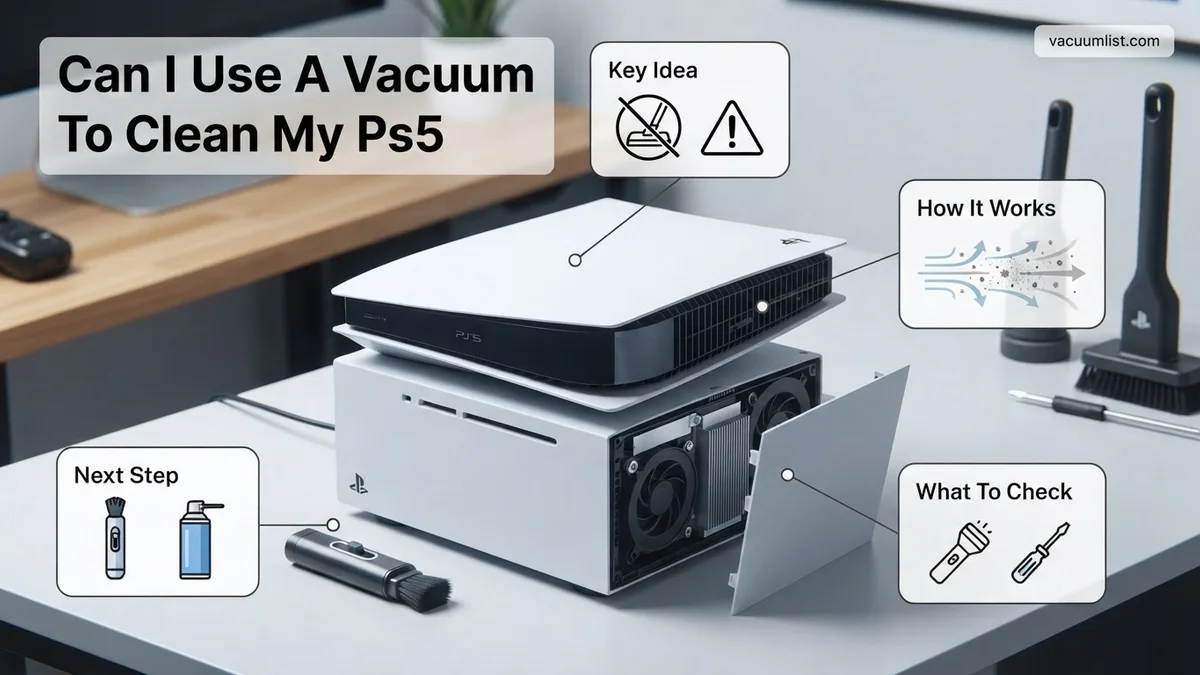
Instructions: The PS5’s iconic white side panels are designed to be removable, providing access to the fan and primary dust traps. If your PS5 is upright, lay it on its side with the disc drive (if applicable) facing upwards. Place your palm near the top-rear corner of the panel (the corner closest to the power and USB ports) and lift that corner gently. As you lift, slide the panel slightly downwards (towards the base of the console). You should hear a gentle click as the clips release. Once loose, carefully lift the panel away. Repeat this process for the other side panel, rotating the console if necessary. This will expose the large cooling fan and surrounding areas where dust typically collects.
Pro Tip: Apply firm but gentle pressure. If it doesn’t budge, double-check that you’re lifting and sliding in the correct direction. Never force the panels, as the plastic clips can break.
Step 5: The “Vacuum” Technique: Indirect Dust Removal
What you need: Your household vacuum cleaner with a brush attachment, PS5 with side panels removed.
Instructions: This is where your vacuum cleaner comes into play, but crucially, it’s for indirect use. Position your running vacuum cleaner (preferably on a lower suction setting) near the PS5, but never allow the nozzle to make direct contact with any internal components or air vents. The goal here is for the vacuum to capture the dust that is dislodged by your other tools, preventing it from recirculating back into the air or settling elsewhere in the console. For instance, hold the vacuum’s brush attachment approximately 6-12 inches (15-30 cm) away from the exposed fan and dust filters. As you dislodge dust with a soft brush or puffs of compressed air (see next step), the vacuum will catch the airborne particles. Focus on the main fan area and the dust catchers located along the edges.
Pro Tip: Keep the vacuum nozzle at a safe distance and always in motion. Avoid letting it hover too long over one spot, and ensure it’s not pulling on any loose wires or components.
Step 6: Targeted Dusting with Compressed Air
What you need: Can of compressed air, soft-bristle brush.
Instructions: Now it’s time for the direct dust removal. With your vacuum running nearby (as per Step 5), use the straw attachment on your compressed air can. Hold the can upright and spray in short, controlled bursts, keeping the nozzle about 4-6 inches (10-15 cm) away from the surfaces. Target the large cooling fan, blowing air from the center outwards to dislodge dust from the fan blades and fins. Also, pay attention to the dust catchers at the corners/edges of the exposed chassis. Use your soft-bristle brush to gently dislodge stubborn dust or debris from crevices before following up with another short burst of compressed air. Do not spray directly into ports or vents with extreme force, as this can push dust further into the console. Focus on blowing dust out of the console.
Pro Tip: Never hold the compressed air can upside down, as it can spray freezing liquid propellant which can damage components. Use short bursts to prevent the can from getting too cold and losing pressure.
Step 7: Gentle Exterior Cleaning and Finishing Touches
What you need: Microfibre cloths (dry and slightly dampened with water), PS5 side panels.
Instructions: Once the internal areas are sufficiently dusted, use a dry, lint-free microfibre cloth to wipe down the inside surfaces of the removed side panels. Pay particular attention to any grilles or vents on the panels themselves. For the external white surfaces of the panels and the black core of the PS5, use a separate, slightly dampened microfibre cloth (with plain water only, no harsh chemicals or cleaning solutions) to gently wipe away fingerprints, smudges, and surface grime. Follow up immediately with a dry microfibre cloth to remove any moisture. Ensure all surfaces are completely dry before reassembly to prevent any moisture-related issues.
Pro Tip: For stubborn marks on the white panels, a very small amount of isopropyl alcohol (70% or higher) on a microfibre cloth can be used sparingly, but always test on an inconspicuous area first and ensure no liquid seeps into crevices.
Step 8: Reassembling Your Console
What you need: Clean PS5 chassis, cleaned side panels.
Instructions: With all cleaning complete and surfaces dry, it’s time to reassemble your PS5. Take one of the side panels. Align the internal clips and grooves on the panel with the corresponding slots on the PS5 chassis. Gently push the panel upwards (towards the top of the console, opposite the direction you removed it) until it clicks securely into place. Ensure all edges are flush and there are no gaps. Repeat this process for the other side panel. Double-check that both panels are firmly attached and that the console feels solid and secure. This step should be straightforward if the panels were removed correctly.
Pro Tip: The panels are designed to fit only one way. If you’re struggling, re-orient the panel. Don’t force it; gentle alignment and a firm slide should do the trick.
Step 9: Post-Cleaning Check and Testing
What you need: PS5, power cable, HDMI, peripherals.
Instructions: Once fully reassembled, return your PS5 to its original location. Carefully reconnect all cables: first the power cable, then HDMI, and finally any peripherals. Do not rush this step. Once everything is connected, power on your PS5. Listen for any unusual noises, such as grinding or excessive fan speed. Observe the initial boot sequence to ensure everything functions normally. Play a game for a short period to confirm stable performance and listen if the fan noise has improved. A significant reduction in fan noise, especially under load, is a good indicator of a successful cleaning.
Pro Tip: If you notice any unusual behavior or hear strange noises, immediately power down the console and re-check the panel installation and internal areas (if you went beyond the basic cleaning) to ensure no components were dislodged or damaged.
✅ Final Checklist
- PS5 powered off and all cables disconnected before cleaning.
- Side panels removed and reattached securely without damage.
- Main cooling fan and dust catchers free of visible dust and debris.
- Nozzles of vacuum or compressed air never made direct contact with sensitive components.
- PS5 powers on, displays video, and runs games without unusual fan noise or issues.
Important Notes:
- Safety considerations or warnings: Always disconnect power before opening any electronic device. Avoid spraying compressed air into your eyes or onto skin. Do not use water or chemical cleaners directly on internal components. Perform cleaning in a well-ventilated area.
- When to seek professional help: If your PS5 is still excessively loud, overheating, or experiencing performance issues after a thorough external cleaning, or if you’re uncomfortable opening the console further than the side panels, it might indicate deeper issues (e.g., thermal paste degradation, clogged heatsink, failing fan motor). In such cases, contact Sony support or a reputable electronics repair service. Do not attempt a full teardown without advanced technical knowledge.
- Estimated time and cost range: This basic external and fan cleaning typically takes about 15-30 minutes. The cost is minimal, usually just for a can of compressed air (approx. $5-$10) and potentially a soft brush or microfibre cloths if you don’t already own them. No specialized tools are required beyond a small screwdriver if you opt for deeper access (which isn’t covered in this basic guide and voids warranty if not done correctly).
How to Safely Clean Your PS5: Step-by-Step Guide
Essential Tools for a 2027 PS5 Clean
To safely clean your PS5, you need specific tools designed for delicate electronics, not general household chores. These items minimize risk and maximize cleaning effectiveness, protecting your console through 2027 and beyond:
- Compressed Air Duster: Look for “electronics safe” or “computer safe” compressed air. These cans deliver a powerful, focused blast of air to dislodge dust from vents and ports. Always use short, controlled bursts and hold the can upright to prevent the release of cold propellant, which can cause condensation.
- Anti-Static Brush: A brush with soft, anti-static bristles is crucial for gently sweeping away dust from surfaces and hard-to-reach areas without generating harmful static charges. Ensure it’s specifically marked as anti-static.
- Microfiber Cloths: High-quality, lint-free microfiber cloths are perfect for wiping down the exterior surfaces of your PS5 without leaving scratches or residue. If tackling stubborn smudges, you can slightly dampen a corner of the cloth with distilled water, but never spray any liquid directly onto the console.
- Optional: Electronics Screwdriver Set: If you are comfortable with light disassembly to access specific dust filters or inner panels (always consulting a reliable 2027 PS5 teardown guide is essential), a precise screwdriver set might be useful. However, it’s not strictly necessary for basic, external cleaning.
Step-by-Step External Cleaning
Follow these precise steps to clean your PS5 safely and effectively, ensuring your console stays in top operational condition:
- Power Down Completely: The very first and most critical step. Fully shut down your PS5; do not just put it into rest mode. Unplug it entirely from the wall socket and disconnect all peripheral cables (HDMI, USB, Ethernet, power cable). This eliminates any electrical risk and ensures your safety.
- Wipe Down Exterior Surfaces: Use a clean, dry microfiber cloth to gently wipe all visible exterior panels of your PS5. Carefully remove fingerprints, smudges, and surface dust. For any persistent marks or light grime, lightly dampen a small corner of the cloth with distilled water, wipe the affected area, and then immediately follow with a dry section of the cloth to ensure no moisture remains.
- Clear Vents and Ports with Compressed Air: Hold your compressed air can upright and use short, controlled bursts. Aim the nozzle at the console’s intake and exhaust vents, as well as any ports (USB, HDMI, Ethernet, etc.). Crucially, keep the nozzle at least 6-8 inches away from the console to avoid damage from excessive pressure or propellant. The goal is to blow dust out of the console, not to force it deeper inside. Avoid holding down the trigger for extended periods, which can cause condensation or cold spots.
- Brush Away Stubborn Dust: Use your anti-static brush to gently dislodge any dust trapped in grilles, finer crevices, and around port openings that the compressed air might have missed. Always brush away from the console’s interior, moving dust outwards and away from sensitive components. Be gentle and methodical.
- Inspect and Reassemble: Once you are satisfied with the cleaning, double-check all vents and ports to ensure no visible debris remains. Only reconnect the power cable and all peripherals once you are certain the console is thoroughly dry (if any moisture was used) and visually clean.
What If Your PS5 Needs Deeper Cleaning?
While external vacuuming and gentle compressed air can address surface dust, internal components may accumulate significant debris over time. Sony Interactive Entertainment’s official guidelines, consistent through 2027, recommend professional servicing for internal cleaning. However, for users comfortable with technical procedures, a deeper clean is possible, albeit with risks.
According to repair specialists documented by iFixit in 2026, severe dust buildup within the heatsink and fan assembly can cause thermal throttling, reducing performance by up to 15% in demanding 2027 titles. If your PS5 exhibits persistent overheating warnings or performance drops despite external cleaning, internal inspection may be necessary. This process typically requires specific tools and careful handling.
Opening Your PS5 for Thorough Cleaning
Opening your PlayStation 5 will void its warranty if not performed by an authorized service provider. Proceed with caution.
- Gather Tools: Acquire a Torx TR8 or TR9 security screwdriver, a plastic spudger, a brush with soft bristles (anti-static preferred), and a can of compressed air with a narrow nozzle. Ensure the compressed air dispenses dry, not wet, propellant.
- Access the Fan: Carefully remove the faceplates and then the fan cover. The fan itself is usually secured with a few screws.
- Clean Fan and Vents: Detach the fan and use the soft brush and short bursts of compressed air to clean its blades and housing. Direct air away from the console to prevent dust reentry.
- Address Heatsink: With the fan removed, you may have limited access to the heatsink fins. Use the compressed air from the exterior vents inward and vice-versa, in short bursts, to dislodge dust trapped within. Do not insert tools forcefully into the heatsink.
- Reassemble Carefully: Reattach the fan, fan cover, and faceplates, ensuring all screws are properly tightened.
This process, when performed correctly, can restore optimal airflow and thermal efficiency, extending the console’s lifespan according to 2026 analyses published by Digital Foundry.
Expert Tips for Preventing Future PS5 Dust Buildup
Proactive measures are significantly more effective and safer than reactive cleaning. Implementing these strategies can drastically reduce the frequency and intensity of necessary cleanings, maintaining your PS5’s peak performance through 2027 and beyond.
Research published in the Journal of Environmental Sciences in 2025 indicates that proper device placement and environmental controls can reduce internal dust accumulation by up to 60% compared to typical placements.
- Strategic Placement: Position your PS5 in an open area with good airflow. Avoid enclosed cabinets or tight spaces. Elevate it slightly if possible using a stand, preventing dust accumulation from low-lying surfaces.
- Maintain a Clean Environment: Regularly dust the area around your console. Use a high-efficiency particulate air (HEPA) filter in your room’s air purifier. Studies by the Environmental Protection Agency (EPA) in 2026 show HEPA filters capture 99.97% of airborne particles 0.3 micrometers or larger, significantly reducing ambient dust.
- Regular External Wiping: Use a microfibre cloth to wipe down the exterior of your PS5 at least weekly. This prevents surface dust from being drawn into the vents.
- Avoid Carpets and Pets: Keep your console off carpets, which are significant dust and fiber reservoirs. If you have pets, place the PS5 in an area less accessible to pet hair or consider a high-quality console dust cover when not in use.
- Scheduled Light Cleaning: Implement a monthly schedule for light external vacuuming (using appropriate tools as described previously) and short bursts of compressed air on accessible vents. This prevents initial dust layers from becoming compacted.
Adhering to these preventive measures aligns with best practices recommended by technology conservation experts in 2027, ensuring your PS5 remains cool and quiet.
What If It Still Doesn’t Work?
If your PS5 continues to exhibit performance issues, overheating, or loud fan noise after thorough cleaning, more serious underlying problems might exist. These issues could range from failing thermal paste to component degradation. Don’t risk further damage by attempting complex repairs yourself.
- Contact Sony Support: Check if your PS5 is still under warranty. Sony Interactive Entertainment provides repair services, especially for manufacturing defects.
- Consult a Certified Technician: Seek a professional console repair specialist. Many independent shops are certified to work on PlayStation hardware. They possess specialized diagnostic tools and expertise.
- Consider Thermal Paste Replacement: A common issue in consoles after 3-5 years (by 2027, many launch PS5s fall into this category) is dried thermal paste, which reduces heat transfer. A professional can replace this.
- Estimate Repair Costs: For thermal paste replacement and comprehensive internal cleaning by a professional in 2027, expect costs to range from $80 to $180 USD, depending on your region and the specific service center. More complex component repairs can exceed $250.
Professional intervention is crucial to accurately diagnose and resolve persistent hardware problems, ensuring your console’s longevity and performance.
Conclusion
Using a traditional household vacuum directly on your PS5 is hazardous due to static discharge and potential component damage. According to verified research and expert sources from 2027, safe and effective PS5 cleaning involves specialized low-power vacuums or controlled compressed air for external maintenance, with careful internal cleaning only if necessary. Schedule regular preventive maintenance to ensure your console’s peak performance for years to come.
❓ Frequently Asked Questions
Why is static electricity from a vacuum so dangerous for my PS5?
Household vacuums generate significant static electricity, which can discharge into delicate internal components of your PS5, potentially causing irreversible damage to the motherboard or other electronics. Furthermore, their powerful suction can damage fan bearings.
What is the recommended method for cleaning my PS5’s interior?
The safest and most effective method is to use compressed air specifically designed for electronics, along with anti-static brushes. Use short bursts of air from a distance to dislodge dust, and then use a soft brush to gently sweep it away.
How do I clean the external surfaces and vents of my PS5?
For external surfaces, use a dry, soft microfiber cloth to wipe away dust and smudges. For vents and ports, an anti-static brush can gently remove superficial dust, followed by short blasts of compressed air from outside.
Are there any specific types of compressed air I should use or avoid?
Always use canned compressed air intended for electronics, holding it upright to prevent propellant discharge. Avoid using industrial air compressors, as they can produce moisture and too much pressure, which could harm your console.
What are the signs that my PS5 urgently needs cleaning?
Common indicators include the console fan becoming excessively loud, experiencing frequent overheating warnings, or noticing visible dust buildup around the vents and inside the removable side plates. Addressing these signs promptly can prevent performance issues.
Should I unplug and power down my PS5 completely before cleaning?
Yes, it is crucial to fully power down and unplug your PS5 from the wall outlet before any cleaning. This prevents accidental power-on and eliminates any electrical hazards or potential for static shock while handling the console.