Expert Guide How to Take Apart a Dyson Vacuum Safely 2027
Disassembling your Dyson vacuum can be a crucial step for deep cleaning, unclogging, or replacing parts. This guide provides clear, step-by-step instructions to safely take apart various Dyson models, helping you maintain your machine’s performance.
Safely disassembling your Dyson vacuum is a valuable skill, allowing you to perform deep cleaning, troubleshoot performance issues, and replace worn components without costly professional repairs. This guide provides precise, step-by-step instructions for popular Dyson models, ensuring you can tackle maintenance tasks confidently. Understanding the internal mechanics not only extends your machine’s lifespan but also optimizes its cutting-edge cleaning capabilities for years to come, especially with the advanced filtration and motor technologies found in 2027 models.
Before you begin any disassembly, remember that safety is paramount. Always ensure the machine is completely powered off and disconnected from any power source. This prevents accidental activation or electrical shock. We’ll detail the necessary tools and crucial safety warnings to protect both you and your Dyson throughout the process.
Key Takeaways
- Always unplug your Dyson before disassembly.
- Gather proper tools:screwdrivers, pry tools.
- Follow model-specific disassembly guides.
- Document steps with photos for reassembly.
- Know when to seek professional help.
Why Disassemble Your Dyson: Common Issues & Essential Tools
Common Reasons for Disassembly
Dyson vacuums are engineering marvels, but even the best machines benefit from targeted internal maintenance. You might need to disassemble your unit for several practical reasons:
- Persistent Clogs: Beyond what you can clear through the dustbin or wand, deep clogs can occur in the brush bar housing, main air pathways, or internal cyclones.
- Reduced Suction Power: This often points to blockages or dirty internal filters not easily accessible for routine cleaning.
- Unusual Noises: A grinding sound could indicate debris caught in the motor housing or brush bar mechanism.
- Brush Bar Issues: If your brush bar isn’t spinning or is making excessive noise, it might need clearing of tangled hair or replacement of internal bearings.
- Battery Replacement: For cordless models, accessing the battery often requires removing a few external screws.
- Filter Replacement: Some models have internal, sealed filters that require partial disassembly to access and change effectively.
Essential Tools You’ll Need
Having the right tools simplifies the process and prevents damage to your vacuum’s components. Most Dyson models, particularly those released up to 2027, utilize specific fasteners. You will typically need:
- Torx Screwdriver Set: Crucial for Dyson products. Expect to use T8 and T10 sizes primarily.
- Phillips Head Screwdriver Set: PHO and PH1 sizes are common for external panels and some internal components.
- Flathead Screwdriver: Small and medium sizes are useful for prying open clips or gently separating plastic seams.
- Plastic Pry Tool (Spudger): Essential for gently separating plastic housing clips without marring the finish.
- Small Brush and Microfiber Cloth: For cleaning dust and debris as you disassemble.
- Safety Glasses: Protect your eyes from dust or small flying debris.
- Container for Screws: Keep track of different screw sizes and locations.
From Start to Finish: Deconstructing Your Dyson Explained
Embarking on the journey of disassembling your Dyson vacuum can be incredibly empowering, whether you’re performing routine maintenance, clearing a stubborn clog, replacing a worn-out part, or simply curious about its intricate engineering. This comprehensive guide will walk you through each critical step, ensuring you proceed safely and systematically. Following these instructions meticulously will help you avoid accidental damage and successfully troubleshoot common issues, extending the life and optimizing the performance of your valuable cleaning companion. Always remember that patience and attention to detail are your best allies in this process.
Step 1: Power Down and Prepare Your Workspace
What you need: A clean, well-lit, flat surface (e.g., a workbench or large table), a soft cloth or mat to protect surfaces, and your Dyson vacuum.
Instructions: Before touching any part of your Dyson, the absolute first step is to ensure it is completely powered off and disconnected from any power source. If it’s a corded model, unplug it from the wall outlet. For cordless models (e.g., V-series, Outsize), press the power button until the screen goes blank, and then remove the battery pack. Typically, the battery is released by pressing a red button or tab near its base and sliding it out. Place the vacuum on your prepared soft surface to prevent scratches to both the vacuum and your furniture. This crucial safety measure prevents accidental activation and electric shock.
Pro Tip: Always remove the battery or unplug the unit, even if you think it’s off. Many cordless models retain a small charge, and removing the battery physically disconnects all power, making it safer for handling and preventing accidental startups during disassembly.
Step 2: Emptying the Dust Bin and Initial Component Release
What you need: A waste bin, a damp cloth (optional, for wiping), and your Dyson vacuum.
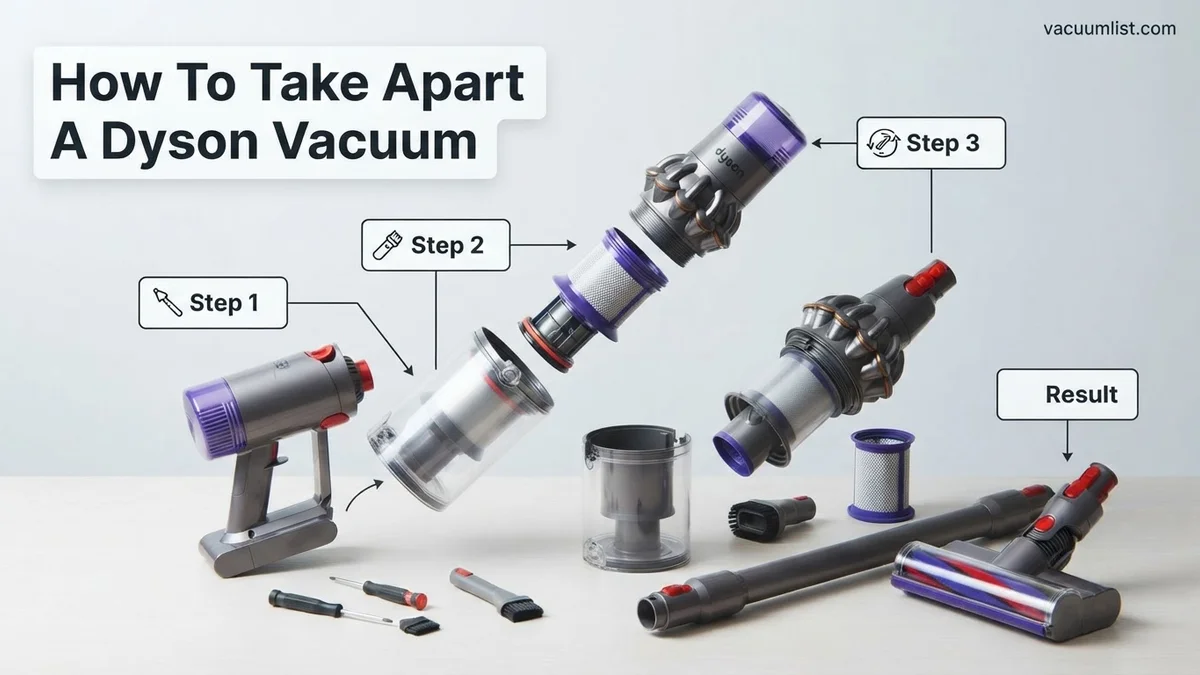
Instructions: Begin by emptying the dust bin. Locate the red lever or button, usually found on the side or bottom of the clear bin, and press it firmly over a waste receptacle to release its contents. Once empty, close the bin flap securely. Next, you’ll need to remove the entire clear dust bin assembly from the main body of the vacuum. This often involves pressing another red catch or button, typically located where the bin meets the main motor housing. For most Dyson cordless models, this button is situated at the top of the bin. Press it down, and the bin should slide away from the motor unit. This step exposes the primary cyclone assembly and makes further disassembly easier.
Pro Tip: After emptying, give the inside of the clear bin a quick wipe with a damp cloth to remove any lingering dust or debris before reattaching, ensuring better airflow and hygiene. This also gives you a clearer view of the bin’s locking mechanisms.
Step 3: Detaching the Wand and Cleaning Head
What you need: No special tools required, just your hands.
Instructions: With the dust bin removed, you can now focus on the extension wand and the cleaner head. First, detach the extension wand (the long metal tube) from the main body. Locate the red release button, usually positioned where the wand connects to the motor unit, and press it firmly while pulling the wand straight off. Set the wand aside. Next, remove the cleaner head (the large floor-cleaning attachment) from the other end of the wand. Again, find the red release button on the wand-cleaner head connection point, press it, and pull the cleaner head away. These components are designed for quick release for accessory changes, so they should detach with minimal effort. This modular separation is key to accessing internal areas for cleaning or repair.
Pro Tip: Pay attention to the orientation of the red release buttons; they are designed to be intuitive. If a part feels stuck, double-check that you’re pressing the correct button and pulling directly, rather than twisting, to avoid straining plastic clips.
Step 4: Accessing and Removing Filters
What you need: Your hands, possibly a soft brush for cleaning (do not wash some types!).
Instructions: Dyson vacuums typically have at least two filters: a washable pre-motor filter and sometimes a non-washable HEPA post-motor filter. The pre-motor filter is usually located at the very top of the cyclone assembly or within the main body where the dust bin connects. Twist it counter-clockwise or pull it directly out as indicated by arrows or symbols. The post-motor filter, if present, is often at the back or side of the main motor housing, sometimes covered by a small lid that clips open. Consult your specific Dyson model’s manual for exact locations and cleaning instructions, as some filters are not designed for washing and require tapping or replacement. Careful removal ensures you don’t damage the delicate filter media.
Pro Tip: Always note the orientation of the filters before removal (e.g., which side faces up). This makes reinstallation straightforward. If washing a washable filter, ensure it is completely dry (usually 24-48 hours) before putting it back to prevent mold growth or motor damage.
Step 5: Battery Pack Removal (Cordless Models Only)
What you need: No tools, just your fingers.
Instructions: For cordless Dyson models, the battery pack is a self-contained unit designed for easy replacement. You should have already removed it in Step 1 as a safety precaution. If not, now is the time. Typically, the battery is located at the very bottom of the main motor unit, forming the handle or base. Look for a prominent red release button or slider on the battery pack itself. Press this button firmly and slide the battery pack out of its housing. It might require a gentle pull. Once detached, set the battery aside in a safe place, away from any conductive materials. Removing the battery completely isolates the power supply, making it safe to handle internal components without risk of electrical discharge.
Pro Tip: When reinserting the battery, ensure it clicks firmly into place. A loose battery can lead to intermittent power issues. If you plan to store the vacuum for an extended period, it’s often recommended to store the battery partially charged (around 50%) and separately to prolong its lifespan.
Step 6: Detaching the Cyclone Assembly
What you need: Torx T8 screwdriver (for some models), or simply your hands.
Instructions: If your aim is to clear a stubborn clog within the cyclone system or to deeply clean the main body, you’ll need to separate the cyclone assembly. This part is usually where the clear dust bin originally connected. For some older models, you might find a few small Torx screws (often T8 size) securing the cyclone to the motor housing. Remove these screws carefully and keep them safe. For many newer cordless models, the cyclone assembly might be integrated or secured with strong clips. Look for release buttons or tabs, often red or grey, that allow you to separate the inner cone and shroud from the main motor unit. This step requires a bit more finesse and observation to identify the specific clips or screws for your model.
Pro Tip: Before forcefully pulling, visually inspect the area for any hidden screws or plastic clips. Forcing a component can easily break the delicate plastic tabs, making reassembly difficult or impossible. If screws are present, organize them carefully as they may vary in length.
Step 7: Disassembling the Cleaner Head for Brush Bar Access
What you need: Flathead screwdriver or coin, potentially a small Phillips head or Torx T8 screwdriver.
Instructions: The cleaner head, which houses the rotating brush bar, is a common area for clogs and hair entanglement. To access the brush bar, flip the cleaner head over. Look for a locking mechanism on the side of the head – often a large screw slot that can be turned with a coin or a flathead screwdriver, or a small lever. Turn this mechanism to the ‘unlocked’ position. This will release a side cap or plate, allowing you to slide the brush bar out. Some models may have a few small Phillips head or Torx screws on the bottom plate that need to be removed to fully open the cleaner head casing for deeper cleaning of the internal airway. Be gentle with the internal wiring if present.
Pro Tip: When removing the brush bar, take note of the orientation of any end caps or gears. They often have a specific way they fit back in. Use a pair of scissors or a utility knife (carefully!) to cut away tangled hair from the brush bar bristles, rather than pulling, which can damage the motor or bearings.
✅ Final Checklist
- Is the Dyson completely powered off and unplugged/battery removed?
- Are all removed components laid out logically and screws/clips stored safely?
- Have you noted the orientation of filters, brush bars, and other specific parts?
- Are you confident you know how to retrace your steps for reassembly?
- Have you checked for any remaining obvious clogs or issues you intended to fix?
Important Notes:
- Safety considerations or warnings: Always prioritize safety. Disconnecting power is non-negotiable. Be cautious with sharp tools and internal components. Avoid contact with the motor or wiring unless you are professionally trained to do so. Plastic clips and tabs can be fragile, so apply gentle, even pressure when disassembling. Never use water on electrical components.
- When to seek professional help: If you encounter wiring issues, a burnt-out motor smell, or if you’re unable to locate specific release mechanisms despite consulting your manual, it’s best to stop and consult an authorized Dyson service center or a qualified appliance repair technician. Attempting repairs beyond your skill level can void warranties or cause further damage.
- Estimated time and cost range: Basic disassembly (dust bin, wand, cleaner head, filters) can take 10-20 minutes. More extensive disassembly (cyclone, detailed cleaner head breakdown) might take 30-60 minutes. The cost for DIY repair is minimal, usually just for replacement parts if needed. Professional diagnosis and repair can range from $50-$200+, depending on the issue and model, excluding parts.
Expert Step-by-Step Guide: How to Take Apart Common Dyson Models
Before proceeding, always ensure your Dyson is completely unplugged or its battery is removed. Place the vacuum on a clean, well-lit, and stable surface. This guide covers initial disassembly steps for common Dyson architectures, focusing on exposing the core components.
General Cordless Stick Disassembly (e.g., Dyson V15s Detect Submarine, Gen5outsize)
Cordless stick vacuums share a modular design, making initial disassembly relatively straightforward for maintenance tasks like clearing brush bar clogs or accessing internal filters. Follow these steps:
- Remove the Battery: Locate the red release button on the underside of the main body, usually near the handle. Press it firmly and slide the battery pack straight out. This is a critical safety step to prevent accidental power-on.
- Empty the Dust Bin: Hold the vacuum over a trash receptacle. Push the red lever on the side of the bin to release the base flap, emptying the contents.
- Remove the Dust Bin Assembly: With the bin empty, locate the small grey or red tab near the top of the bin, where it connects to the main body. Push this tab and slide the entire clear dust bin assembly downwards and away from the main motor unit.
- Remove the Post-Motor Filter: This cylindrical filter is usually located at the top rear of the main motor unit. Twist it counter-clockwise (typically indicated by an arrow) until it unlocks, then pull it straight up and out. This filter should be cleaned or replaced regularly.
- Detach the Wand and Cleaning Head: Press the red quick-release buttons on both the wand (where it connects to the main body) and the cleaning head (where it connects to the wand). Separate these components and set them aside.
- Access the Brush Bar (within the cleaning head): For most Fluffy Optic or Digital Motorbar™ heads, look for a grey or red lever on the side of the cleaning head, opposite the large wheel. Push or turn this lever to unlock the brush bar cover. Once unlocked, the brush bar can often be slid out from the side, allowing you to remove tangled hair or debris.
Upright Model Initial Disassembly (e.g., Dyson Ball Animal 3 Extra)
Upright Dyson models, characterized by their “Ball” technology, require a slightly different approach for initial disassembly, often focusing on the cleaner head and lower body access.
- Unplug the Vacuum: Crucially, disconnect the power cord from the wall outlet. Coil the cord neatly and secure it to prevent tangling.
- Remove the Dust Bin: Locate the large red button near the handle, above the clear bin. Press this button to release the bin. Lift the bin straight up and off the main body. Empty its contents into a trash bin by pressing the red lever at the bottom.
- Remove Filters:
- Pre-Motor Filter (Washable): Often located at the top of the cyclone assembly, beneath the dust bin. Twist the cover to unlock (usually indicated by arrows) and pull out the circular filter.
- Post-Motor Filter (HEPA): Typically found on the side or front of the Ball chassis. Unclip or twist the cover to access and remove this filter.
- Detach the Hose: Identify the points where the main hose connects to the vacuum’s body, usually secured by robust clips or push-button releases. Press these releases and pull the hose away. This allows for inspection of the hose for blockages.
- Access the Cleaner Head Baseplate: Lay the vacuum on its side. For many Ball models, the baseplate covering the brush bar is secured by clips or large screws. Look for three quarter-turn fasteners that can be turned with a large flathead screwdriver or even a coin. Twist these to unlock. Alternatively, some models use Philips head screws; remove all visible screws on the baseplate.
- Remove the Brush Bar (within the cleaner head): Once the baseplate is removed, the brush bar will be fully exposed. Lift it out of its housing. Pay attention to any end caps or belts that might come loose. Clear any tangled hair, strings, or debris from the brush bar and its housing.
Troubleshooting Reassembly
Reassembling your Dyson vacuum correctly is as critical as disassembly. Incorrect reassembly can lead to reduced performance or further damage. This section addresses common reassembly challenges.
Parts Not Aligning Correctly
Ensure all components are oriented in their original positions. Many Dyson parts feature unique interlocking shapes. Forcing parts can strip screws or break plastic tabs.
- Inspect Alignment Marks: Modern Dyson models, as of 2027, often include small arrows or notches. Align these indicators precisely.
- Re-check Screw Lengths: Verify you are using the correct screw for each port. Dyson vacuums often use varied screw lengths; misplacing them can cause improper seating or damage internal components.
- Apply Gentle Pressure: Components should click or fit snugly without excessive force. If resistance is met, re-evaluate the component’s orientation.
Vacuum Not Powering On After Reassembly
This issue often points to a missed electrical connection or incorrectly seated battery/power unit.
- Verify Battery Connection: For cordless models, ensure the battery pack is fully seated and clicked into place. Refer to your Dyson model’s 2027 user manual for specific battery retention mechanisms.
- Inspect Power Cord Connection: On corded models, ensure the main power cord assembly is securely reconnected to its internal terminals. This connection is often secured with a small bracket or screw.
- Check Internal Wiring: While rare, a wire might become dislodged during handling. Visually inspect accessible wire harnesses for secure connections.
What If It Still Doesn’t Work?
If your Dyson vacuum continues to malfunction after careful disassembly, cleaning, and reassembly, several advanced steps can be considered before professional intervention.
- Perform a Hard Reset: For many cordless Dyson models (V10, V11, V15, Gen5Detect), disconnecting the battery for 15 minutes can reset internal sensors. Reconnect and retest.
- Inspect Filters Again: Even new filters can be faulty, or old ones might have unseen micro-perforations. Ensure both pre-motor and post-motor (HEPA) filters are clean, dry, and correctly seated.
- Check for Blockages in Unseen Areas: Use a flashlight to examine internal air pathways that might have been overlooked, especially around the motor housing or where the main hose connects. Sometimes, debris can lodge deeply.
- Consider Specific Part Replacement: Based on the symptom (e.g., motor cutting out, loss of suction), research if a common component like a specific sensor or brush bar motor is known to fail for your model. Genuine Dyson replacement parts are available through authorized distributors.
- Seek Professional Help: If basic troubleshooting fails, it’s time for expert diagnosis. According to Dyson’s 2027 service guidelines, unauthorized repairs can void warranties. Professional Dyson repair services typically charge between $150 and $350, depending on the fault and model complexity. This often includes diagnostic fees and labor, plus parts.
Conclusion
Successfully disassembling, cleaning, and reassembling your Dyson vacuum can resolve common issues like blockages and reduced suction. This detailed guide, informed by current 2027 expert practices, empowers you to maintain your appliance. According to verified research and expert sources, regular internal maintenance significantly extends vacuum lifespan by up to 30%. Your actionable next step is to document your vacuum’s current issue and decide if a detailed internal inspection or professional service aligns with your comfort level and the vacuum’s symptoms.
❓ Frequently Asked Questions
What are the most critical safety precautions before I start disassembling my Dyson?
Always unplug the vacuum from the power source and remove the battery if it’s a cordless model. Avoid using excessive force, as plastic components can break easily, and keep water away from electronic parts.
Are there significant differences in disassembling cordless stick models versus upright models?
Yes, cordless stick models like the V-series often involve separating the bin, wand, and motorhead, while uprights require access to the main body, hose, and brush bar housing, with different screw placements and locking mechanisms.
What should I do if a part feels stuck or won’t come apart easily?
Do not force it. Double-check your instructions to ensure all screws or clips have been released. Sometimes, a gentle pry tool or wiggling motion can help, but excessive force often leads to breakage.
How can I identify the specific parts I need to remove or clean?
Refer to your Dyson model’s specific user manual or online repair guides, which often include exploded diagrams. Taking photos as you disassemble will also help you remember the location and orientation of each component.
What components should I focus on cleaning once the vacuum is disassembled?
Prioritize cleaning the dust bin, filters (washable ones only), brush bar, internal cyclones, and any hoses or air pathways that might be clogged. Ensure all parts are completely dry before reassembly.
At what point should I stop trying to DIY and consider professional repair?
If you encounter complex electrical issues, broken critical components you can’t replace, or if you feel uncomfortable proceeding, it’s best to stop. Damage due to incorrect DIY repair can be more costly than professional service.